# https://developers.docusign.com/docs/clm-api/?utm_source=chatgpt.com llms-full.txt
## Docusign CLM API
[CLM API](https://developers.docusign.com/docs/clm-api/)
[CLM API 101](https://developers.docusign.com/docs/clm-api/clm101/)
[Authentication overview](https://developers.docusign.com/docs/clm-api/clm101/auth/)
[Salesforce client authentication](https://developers.docusign.com/docs/clm-api/clm101/salesforce-clients/)
[Object API](https://developers.docusign.com/docs/clm-api/clm101/object-api/)
[Task API](https://developers.docusign.com/docs/clm-api/clm101/task-api/)
[Content API](https://developers.docusign.com/docs/clm-api/clm101/content-api/)
[Response and error codes](https://developers.docusign.com/docs/clm-api/clm101/response-error-codes/)
[API rules and resource limits](https://developers.docusign.com/docs/clm-api/clm101/rules-and-limits/)
[Cross-Origin Resource Sharing (CORS)](https://developers.docusign.com/docs/clm-api/clm101/cors/)
[Release notes](https://support.docusign.com/en/releasenotes)
[Go-Live](https://developers.docusign.com/docs/clm-api/go-live/)
[API reference](https://developers.docusign.com/docs/clm-api/reference/)
[CLM API](https://developers.docusign.com/docs/clm-api/)
[CLM API 101](https://developers.docusign.com/docs/clm-api/clm101/)
[Authentication overview](https://developers.docusign.com/docs/clm-api/clm101/auth/)
[Salesforce client authentication](https://developers.docusign.com/docs/clm-api/clm101/salesforce-clients/)
[Object API](https://developers.docusign.com/docs/clm-api/clm101/object-api/)
[Task API](https://developers.docusign.com/docs/clm-api/clm101/task-api/)
[Content API](https://developers.docusign.com/docs/clm-api/clm101/content-api/)
[Response and error codes](https://developers.docusign.com/docs/clm-api/clm101/response-error-codes/)
[API rules and resource limits](https://developers.docusign.com/docs/clm-api/clm101/rules-and-limits/)
[Cross-Origin Resource Sharing (CORS)](https://developers.docusign.com/docs/clm-api/clm101/cors/)
[Release notes](https://support.docusign.com/en/releasenotes)
[Go-Live](https://developers.docusign.com/docs/clm-api/go-live/)
[API reference](https://developers.docusign.com/docs/clm-api/reference/)
# CLM API overview
Developing with the CLM API is only available for CLM customers with a production account. To purchase a plan to gain access to the CLM API, contact [Docusign Sales](https://www.docusign.com/contact-sales).
Integrate document generation and management workflow into your Salesforce and custom apps. The Docusign Contract Lifecycle Management (CLM) API enables developers to interact with Docusign CLM documents, data, and services.
This content is for the latest version of the Docusign CLM API. If you are looking for legacy Spring CM API content, see the [CLM.CM API](https://developers.docusign.com/docs/clm-api/clm.cm/) version.
## Places to start
[API 101](https://developers.docusign.com/docs/clm-api/clm101/)
[API reference](https://developers.docusign.com/docs/clm-api/reference/)

## Features
### Easy transition from SOAP API to CLM API
1-to-1 mapping of endpoints with additional endpoints to use
### Cross-Origin Resource Sharing (CORS)
Access a normally restricted resource via JavaScript, such as uploading and downloading documents, directly to Docusign CLM from white-listed domains
### Access tokens for more security
Along with other authentication flows, an access token must be used to make any API call
## Discover more
- [Understand key features of Docusign CLM](https://www.docusign.com/products/clm)
- [Follow along with the Guide to contract lifecycle management](https://www.docusign.com/sites/default/files/resource_event_files/guide_to_contract_lifecycle_management.pdf)
[\\
\\
Platform 101\\
\\
Get up to speed on our concepts and platform](https://developers.docusign.com/platform/build-integration/) [Learn More](https://developers.docusign.com/platform/build-integration/)[\\
\\
Docusign Community\\
\\
Get answers from our API experts and community](https://community.docusign.com/developer-59) [Learn More](https://community.docusign.com/developer-59)[\\
\\
GitHub\\
\\
Find our SDKs and other source code](https://github.com/docusign) [Learn More](https://github.com/docusign)[\\
\\
Partner Directory\\
\\
See the full directory of Docusign partners](https://partners.docusign.com/s/partnerfinder) [Learn More](https://partners.docusign.com/s/partnerfinder)
[](https://docusign.com/)
[](https://x.com/DocusignDevs)[](https://www.youtube.com/@DocusignDevs)[](https://www.linkedin.com/showcase/docusigndevs/)
APIs- [eSignature API](https://developers.docusign.com/docs/esign-rest-api/)
- [Web Forms API](https://developers.docusign.com/docs/web-forms-api/)
- [Maestro API](https://developers.docusign.com/docs/maestro-api/)
- [Navigator API](https://developers.docusign.com/docs/navigator-api/)
- [Docusign Admin API](https://developers.docusign.com/docs/admin-api/)
- [View all](https://developers.docusign.com/docs/)
Featured Content- [Quickstart](https://developers.docusign.com/docs/esign-rest-api/quickstart/)
- [Sample Apps](https://developers.docusign.com/sample-apps/)
- [Authentication](https://developers.docusign.com/platform/auth/)
- [Webhooks](https://developers.docusign.com/platform/webhooks/)
- [Go-Live](https://developers.docusign.com/platform/go-live/)
- [SDKs](https://developers.docusign.com/docs/sdks/)
Help- [Support](https://developers.docusign.com/support/)
- [FAQs](https://support.docusign.com/s/articles/DocuSign-Developer-Support-FAQs)
More- [Partner With Us](https://developers.docusign.com/partner/)
- [Docusign University](https://developers.docusign.com/training/)
- [Trust Center](https://www.docusign.com/trust)
- [Trust Portal](https://www.docusign.com/trust-portal)
- [ISV integration guides](https://developers.docusign.com/partner/isv-integration-guides/)
[](https://x.com/DocusignDevs)[](https://www.youtube.com/@DocusignDevs)[](https://www.linkedin.com/showcase/docusigndevs/)
© 2024 Docusign, Inc.
[Docusign.com](https://docusign.com/)
[Terms of Use](https://www.docusign.com/company/terms-and-conditions/developers)
[Privacy Notice](https://www.docusign.com/company/privacy-policy)
[Notice to California Residents](https://www.docusign.com/privacy#8)
[Intellectual Property](https://www.docusign.com/IP)
Your Privacy Choices

## Docusign CLM API Guide
[CLM API](https://developers.docusign.com/docs/clm-api/)
[CLM API 101](https://developers.docusign.com/docs/clm-api/clm101/)
[Authentication overview](https://developers.docusign.com/docs/clm-api/clm101/auth/)
[Salesforce client authentication](https://developers.docusign.com/docs/clm-api/clm101/salesforce-clients/)
[Object API](https://developers.docusign.com/docs/clm-api/clm101/object-api/)
[Task API](https://developers.docusign.com/docs/clm-api/clm101/task-api/)
[Content API](https://developers.docusign.com/docs/clm-api/clm101/content-api/)
[Response and error codes](https://developers.docusign.com/docs/clm-api/clm101/response-error-codes/)
[API rules and resource limits](https://developers.docusign.com/docs/clm-api/clm101/rules-and-limits/)
[Cross-Origin Resource Sharing (CORS)](https://developers.docusign.com/docs/clm-api/clm101/cors/)
[Release notes](https://support.docusign.com/en/releasenotes)
[Go-Live](https://developers.docusign.com/docs/clm-api/go-live/)
[API reference](https://developers.docusign.com/docs/clm-api/reference/)
CLM API 101
[CLM API](https://developers.docusign.com/docs/clm-api/)
[CLM API 101](https://developers.docusign.com/docs/clm-api/clm101/)
[Authentication overview](https://developers.docusign.com/docs/clm-api/clm101/auth/)
[Salesforce client authentication](https://developers.docusign.com/docs/clm-api/clm101/salesforce-clients/)
[Object API](https://developers.docusign.com/docs/clm-api/clm101/object-api/)
[Task API](https://developers.docusign.com/docs/clm-api/clm101/task-api/)
[Content API](https://developers.docusign.com/docs/clm-api/clm101/content-api/)
[Response and error codes](https://developers.docusign.com/docs/clm-api/clm101/response-error-codes/)
[API rules and resource limits](https://developers.docusign.com/docs/clm-api/clm101/rules-and-limits/)
[Cross-Origin Resource Sharing (CORS)](https://developers.docusign.com/docs/clm-api/clm101/cors/)
[Release notes](https://support.docusign.com/en/releasenotes)
[Go-Live](https://developers.docusign.com/docs/clm-api/go-live/)
[API reference](https://developers.docusign.com/docs/clm-api/reference/)
# CLM API 101
Developing with the CLM API is only available for CLM customers with a production account. To purchase a plan to gain access to the CLM API, [contact Docusign Sales](https://www.docusign.com/contact-sales).
The Docusign CLM API enables developers to interact with Docusign CLM documents, data, and services. Most objects and services available in the Docusign CLM web application are supported in the API. Users and groups are managed through [Docusign Admin](https://www.docusign.com/products/admin). See [Object API](https://developers.docusign.com/docs/clm-api/clm101/object-api/) for more information.
For additional issues or requests, visit the [Docusign Support Center](https://support.docusign.com/).
The Docusign CLM API contains the following logical sub-APIs for working programmatically with Docusign CLM:
- [Object API](https://developers.docusign.com/docs/clm-api/clm101/object-api/): API methods that create, read, update, and delete (CRUD) Docusign CLM objects, such as folders.
- [Task API](https://developers.docusign.com/docs/clm-api/clm101/task-api/): API methods that expose Docusign CLM services that are invoked as asynchronous tasks, such as zipping files or running searches.
- [Content API](https://developers.docusign.com/docs/clm-api/clm101/content-api/): API methods for uploading, downloading, and versioning documents in Docusign CLM.
## Base URLs
All API URLs use the following format:
```
https://[base url]/[version]/[Docusign Account Id]/[resource identifier]
```
Docusign CLM is distributed across several data centers, and the base URLs for the Object, Task, and Content APIs are data center–specific. You can determine the data center associated with an account by looking at the subdomain of the URL after you log in to the Docusign CLM web application (for example, na11 or s1.us). Content API URLs are properties of the document and folder objects and are discoverable at run time.
You can also get your account-related URLs, including the base CLM API URLs, by making a GET request to these endpoints:
**UAT**: `https://authuat.springcm.com/api/v2/{Docusign API Account ID}/account`
**Production**: `https://auth.springcm.com/api/v2/{Docusign API Account ID}/account`
To find your Docusign API Account ID, log in to your eSignature account and select **Admin** from the top menu, then select **Apps and Keys** from the left navigation. Copy your **API Account ID** value.
**Note**: Similar to endpoints for resources, these endpoints require:
- CLM to be enabled for your account.
- A valid access token in the authorization header. You must request the `springcm_read` scope when you request the access token. See [Authentication](https://developers.docusign.com/docs/clm-api/clm101/auth/) for details.
### Production endpoints
| | |
| --- | --- |
| **API** | **Endpoint** |
| **Production Object API** | https://api.\[datacenter\].clm.docusign.net,
https://api\[datacenter\].springcm.com |
| **Production Task API** | https://api\[datacenter\].springcm.com,
https://api.\[datacenter\].clm.docusign.net |
| **Production Content Upload API** | https://apiupload\[datacenter\].springcm.com,
https://apiupload.\[datacenter\].clm.docusign.net |
| **Production Content Download API** | https://apidownload\[datacenter\].springcm.com,
https://apidownload.\[datacenter\].clm.docusign.net |
### UAT endpoints
| | |
| --- | --- |
| **API** | **Endpoint** |
| **UAT Object API** | https://apiuat\[datacenter\].springcm.com,
https://api.\[datacenter\].clm.demo.docusign.net |
| **UAT Task API** | https://apiuat\[datacenter\].springcm.com,
https://api.\[datacenter\].clm.demo.docusign.net |
| **UAT Content Upload API** | https://apiuploaduat\[datacenter\].springcm.com,
https://apiupload.\[datacenter\].clm.demo.docusign.net |
| **UAT Content Download API** | https://apidownloaduat\[datacenter\].springcm.com,
https://apidownload.\[datacenter\].clm.demo.docusign.net |
## Request and response formats
The Docusign CLM Object and Task APIs support JSON for all requests and responses. The Content API by default will download documents in the native format in which they were uploaded. For certain document types, Docusign CLM will also maintain a copy of the document in additional formats such as _.PDF_, _.PNG_, or _.TXT_. See the [Content API reference](https://developers.docusign.com/docs/clm-api/reference/content/) for more information.
## Places to start
Start learning about developing with the CLM API:
- [Learn how to authenticate](https://developers.docusign.com/docs/clm-api/clm101/auth/) with the CLM API.
- [Learn about the rules and resource limits](https://developers.docusign.com/docs/clm-api/clm101/rules-and-limits/) enforced in the CLM API.
- [Learn how to go-live](https://developers.docusign.com/docs/clm-api/go-live/) with a CLM API integration.
- Create an account and learn about core Docusign functionality with the [Docusign platform](https://developers.docusign.com/platform/build-integration/).
[\\
\\
Platform 101\\
\\
Get up to speed on our concepts and platform](https://developers.docusign.com/platform/build-integration/) [Learn More](https://developers.docusign.com/platform/build-integration/)[\\
\\
Docusign Community\\
\\
Get answers from our API experts and community](https://community.docusign.com/developer-59) [Learn More](https://community.docusign.com/developer-59)[\\
\\
GitHub\\
\\
Find our SDKs and other source code](https://github.com/docusign) [Learn More](https://github.com/docusign)[\\
\\
Partner Directory\\
\\
See the full directory of Docusign partners](https://partners.docusign.com/s/partnerfinder) [Learn More](https://partners.docusign.com/s/partnerfinder)
[](https://docusign.com/)
[](https://x.com/DocusignDevs)[](https://www.youtube.com/@DocusignDevs)[](https://www.linkedin.com/showcase/docusigndevs/)
APIs- [eSignature API](https://developers.docusign.com/docs/esign-rest-api/)
- [Web Forms API](https://developers.docusign.com/docs/web-forms-api/)
- [Maestro API](https://developers.docusign.com/docs/maestro-api/)
- [Navigator API](https://developers.docusign.com/docs/navigator-api/)
- [Docusign Admin API](https://developers.docusign.com/docs/admin-api/)
- [View all](https://developers.docusign.com/docs/)
Featured Content- [Quickstart](https://developers.docusign.com/docs/esign-rest-api/quickstart/)
- [Sample Apps](https://developers.docusign.com/sample-apps/)
- [Authentication](https://developers.docusign.com/platform/auth/)
- [Webhooks](https://developers.docusign.com/platform/webhooks/)
- [Go-Live](https://developers.docusign.com/platform/go-live/)
- [SDKs](https://developers.docusign.com/docs/sdks/)
Help- [Support](https://developers.docusign.com/support/)
- [FAQs](https://support.docusign.com/s/articles/DocuSign-Developer-Support-FAQs)
More- [Partner With Us](https://developers.docusign.com/partner/)
- [Docusign University](https://developers.docusign.com/training/)
- [Trust Center](https://www.docusign.com/trust)
- [Trust Portal](https://www.docusign.com/trust-portal)
- [ISV integration guides](https://developers.docusign.com/partner/isv-integration-guides/)
[](https://x.com/DocusignDevs)[](https://www.youtube.com/@DocusignDevs)[](https://www.linkedin.com/showcase/docusigndevs/)
© 2024 Docusign, Inc.
[Docusign.com](https://docusign.com/)
[Terms of Use](https://www.docusign.com/company/terms-and-conditions/developers)
[Privacy Notice](https://www.docusign.com/company/privacy-policy)
[Notice to California Residents](https://www.docusign.com/privacy#8)
[Intellectual Property](https://www.docusign.com/IP)
Your Privacy Choices

## CLM API Rate Limits
[CLM.CM API](https://developers.docusign.com/docs/clm-api/clm.cm/)
[Overview](https://developers.docusign.com/docs/clm-api/clm.cm/)
[CLM.CM API 101](https://developers.docusign.com/docs/clm-api/clm.cm/clm101/)
[Getting Started](https://developers.docusign.com/docs/clm-api/clm.cm/clm101/)
[Overview](https://developers.docusign.com/docs/clm-api/clm.cm/clm101/overview/)
[Response and Error Codes](https://developers.docusign.com/docs/clm-api/clm.cm/clm101/response-and-error-codes/)
[Rate Limits](https://developers.docusign.com/docs/clm-api/clm.cm/clm101/rate-limits/)
[Authentication: Overview](https://developers.docusign.com/docs/clm-api/clm.cm/clm101/authentication/)
[Authentication: OAuth 2.0 Web Server Flow](https://developers.docusign.com/docs/clm-api/clm.cm/clm101/authentication/oauth2-web-server-flow/)
[Authentication: Salesforce Client Flow](https://developers.docusign.com/docs/clm-api/clm.cm/clm101/authentication/salesforce-client-flow/)
[Authentication: API User Authentication Flow](https://developers.docusign.com/docs/clm-api/clm.cm/clm101/authentication/api-user-authentication-flow/)
[Object API](https://developers.docusign.com/docs/clm-api/clm.cm/clm101/object-api/)
[Task API](https://developers.docusign.com/docs/clm-api/clm.cm/clm101/task-api/)
[Content API](https://developers.docusign.com/docs/clm-api/clm.cm/clm101/content-api/)
[Cross-Origin Resource Sharing (CORS)](https://developers.docusign.com/docs/clm-api/clm.cm/clm101/cross-origin-resource-sharing/)
[Migrating from the SOAP API to the REST API](https://developers.docusign.com/docs/clm-api/clm.cm/clm101/migrating-soap-to-rest/)
[CLM.CM API Reference](https://apidocsna11.springcm.com/apidocs)
Rate Limits
[CLM.CM API](https://developers.docusign.com/docs/clm-api/clm.cm/)
[Overview](https://developers.docusign.com/docs/clm-api/clm.cm/)
[CLM.CM API 101](https://developers.docusign.com/docs/clm-api/clm.cm/clm101/)
[Getting Started](https://developers.docusign.com/docs/clm-api/clm.cm/clm101/)
[Overview](https://developers.docusign.com/docs/clm-api/clm.cm/clm101/overview/)
[Response and Error Codes](https://developers.docusign.com/docs/clm-api/clm.cm/clm101/response-and-error-codes/)
[Rate Limits](https://developers.docusign.com/docs/clm-api/clm.cm/clm101/rate-limits/)
[Authentication: Overview](https://developers.docusign.com/docs/clm-api/clm.cm/clm101/authentication/)
[Authentication: OAuth 2.0 Web Server Flow](https://developers.docusign.com/docs/clm-api/clm.cm/clm101/authentication/oauth2-web-server-flow/)
[Authentication: Salesforce Client Flow](https://developers.docusign.com/docs/clm-api/clm.cm/clm101/authentication/salesforce-client-flow/)
[Authentication: API User Authentication Flow](https://developers.docusign.com/docs/clm-api/clm.cm/clm101/authentication/api-user-authentication-flow/)
[Object API](https://developers.docusign.com/docs/clm-api/clm.cm/clm101/object-api/)
[Task API](https://developers.docusign.com/docs/clm-api/clm.cm/clm101/task-api/)
[Content API](https://developers.docusign.com/docs/clm-api/clm.cm/clm101/content-api/)
[Cross-Origin Resource Sharing (CORS)](https://developers.docusign.com/docs/clm-api/clm.cm/clm101/cross-origin-resource-sharing/)
[Migrating from the SOAP API to the REST API](https://developers.docusign.com/docs/clm-api/clm.cm/clm101/migrating-soap-to-rest/)
[CLM.CM API Reference](https://apidocsna11.springcm.com/apidocs)
# Rate Limits
Developing with the CLM API is only available for CLM customers with a production account. To purchase a plan to gain access to the CLM API, [contact Docusign Sales](https://www.docusign.com/contact-sales).
The Docusign CLM API has rate limits that are currently set high enough that they should not be reached under normal usage of the API. In the case that a rate limit is exceeded, a 429 response code will be sent back along with some additional information. There are two different ways to exceed an API rate limiter: too many requests for a Docusign CLM account within a given time period of time and too many concurrent requests for a single user. Sample JSON responses for each type of limit are shown to the right:
- **Exceed the concurrent number of requests for a given user**
- **Exceed the number of requests for an account in a given time period**
When the number of requests for an account is exceeded the customer header **X-RateLimit-Reset** will be returned that will hold the date/time of when requests for the account can resume.
- Example rate limit exceeded response
1
2
3
4
5
6
7
8
9
10
{
"Error":
{
"HttpStatusCode":429,
"UserMessage":"You may only have XX concurrent
requests open.",
"DeveloperMessage":"User request forbidden due to
XX concurrently open requests.",
"ErrorCode":103,
"ReferenceId":"7b45dd15-xxxx-xxxx-xxxx-4fe5df8e950a
"
}
}
- Example number of account requests exceeded response
1
2
3
4
5
6
7
8
9
10
{
"Error":
{
"HttpStatusCode":429,
"UserMessage":"Rate limit exceeded.",
"DeveloperMessage":"Rate limit exceeded.",
"ErrorCode":103,
"ReferenceId":"5594dbc0-xxxx-xxxx-xxxx-9721d441a1aa
"
}
}
[\\
\\
Platform 101\\
\\
Get up to speed on our concepts and platform](https://developers.docusign.com/platform/build-integration/) [Learn More](https://developers.docusign.com/platform/build-integration/)[\\
\\
Docusign Community\\
\\
Get answers from our API experts and community](https://community.docusign.com/developer-59) [Learn More](https://community.docusign.com/developer-59)[\\
\\
GitHub\\
\\
Find our SDKs and other source code](https://github.com/docusign) [Learn More](https://github.com/docusign)[\\
\\
Partner Directory\\
\\
See the full directory of Docusign partners](https://partners.docusign.com/s/partnerfinder) [Learn More](https://partners.docusign.com/s/partnerfinder)
[](https://docusign.com/)
[](https://x.com/DocusignDevs)[](https://www.youtube.com/@DocusignDevs)[](https://www.linkedin.com/showcase/docusigndevs/)
APIs- [eSignature API](https://developers.docusign.com/docs/esign-rest-api/)
- [Web Forms API](https://developers.docusign.com/docs/web-forms-api/)
- [Maestro API](https://developers.docusign.com/docs/maestro-api/)
- [Navigator API](https://developers.docusign.com/docs/navigator-api/)
- [Docusign Admin API](https://developers.docusign.com/docs/admin-api/)
- [View all](https://developers.docusign.com/docs/)
Featured Content- [Quickstart](https://developers.docusign.com/docs/esign-rest-api/quickstart/)
- [Sample Apps](https://developers.docusign.com/sample-apps/)
- [Authentication](https://developers.docusign.com/platform/auth/)
- [Webhooks](https://developers.docusign.com/platform/webhooks/)
- [Go-Live](https://developers.docusign.com/platform/go-live/)
- [SDKs](https://developers.docusign.com/docs/sdks/)
Help- [Support](https://developers.docusign.com/support/)
- [FAQs](https://support.docusign.com/s/articles/DocuSign-Developer-Support-FAQs)
More- [Partner With Us](https://developers.docusign.com/partner/)
- [Docusign University](https://developers.docusign.com/training/)
- [Trust Center](https://www.docusign.com/trust)
- [Trust Portal](https://www.docusign.com/trust-portal)
- [ISV integration guides](https://developers.docusign.com/partner/isv-integration-guides/)
[](https://x.com/DocusignDevs)[](https://www.youtube.com/@DocusignDevs)[](https://www.linkedin.com/showcase/docusigndevs/)
© 2024 Docusign, Inc.
[Docusign.com](https://docusign.com/)
[Terms of Use](https://www.docusign.com/company/terms-and-conditions/developers)
[Privacy Notice](https://www.docusign.com/company/privacy-policy)
[Notice to California Residents](https://www.docusign.com/privacy#8)
[Intellectual Property](https://www.docusign.com/IP)
Your Privacy Choices

## API User Authentication
[CLM.CM API](https://developers.docusign.com/docs/clm-api/clm.cm/)
[Overview](https://developers.docusign.com/docs/clm-api/clm.cm/)
[CLM.CM API 101](https://developers.docusign.com/docs/clm-api/clm.cm/clm101/)
[Getting Started](https://developers.docusign.com/docs/clm-api/clm.cm/clm101/)
[Overview](https://developers.docusign.com/docs/clm-api/clm.cm/clm101/overview/)
[Response and Error Codes](https://developers.docusign.com/docs/clm-api/clm.cm/clm101/response-and-error-codes/)
[Rate Limits](https://developers.docusign.com/docs/clm-api/clm.cm/clm101/rate-limits/)
[Authentication: Overview](https://developers.docusign.com/docs/clm-api/clm.cm/clm101/authentication/)
[Authentication: OAuth 2.0 Web Server Flow](https://developers.docusign.com/docs/clm-api/clm.cm/clm101/authentication/oauth2-web-server-flow/)
[Authentication: Salesforce Client Flow](https://developers.docusign.com/docs/clm-api/clm.cm/clm101/authentication/salesforce-client-flow/)
[Authentication: API User Authentication Flow](https://developers.docusign.com/docs/clm-api/clm.cm/clm101/authentication/api-user-authentication-flow/)
[Object API](https://developers.docusign.com/docs/clm-api/clm.cm/clm101/object-api/)
[Task API](https://developers.docusign.com/docs/clm-api/clm.cm/clm101/task-api/)
[Content API](https://developers.docusign.com/docs/clm-api/clm.cm/clm101/content-api/)
[Cross-Origin Resource Sharing (CORS)](https://developers.docusign.com/docs/clm-api/clm.cm/clm101/cross-origin-resource-sharing/)
[Migrating from the SOAP API to the REST API](https://developers.docusign.com/docs/clm-api/clm.cm/clm101/migrating-soap-to-rest/)
[CLM.CM API Reference](https://apidocsna11.springcm.com/apidocs)
Authentication: API User Authentication Flow
[CLM.CM API](https://developers.docusign.com/docs/clm-api/clm.cm/)
[Overview](https://developers.docusign.com/docs/clm-api/clm.cm/)
[CLM.CM API 101](https://developers.docusign.com/docs/clm-api/clm.cm/clm101/)
[Getting Started](https://developers.docusign.com/docs/clm-api/clm.cm/clm101/)
[Overview](https://developers.docusign.com/docs/clm-api/clm.cm/clm101/overview/)
[Response and Error Codes](https://developers.docusign.com/docs/clm-api/clm.cm/clm101/response-and-error-codes/)
[Rate Limits](https://developers.docusign.com/docs/clm-api/clm.cm/clm101/rate-limits/)
[Authentication: Overview](https://developers.docusign.com/docs/clm-api/clm.cm/clm101/authentication/)
[Authentication: OAuth 2.0 Web Server Flow](https://developers.docusign.com/docs/clm-api/clm.cm/clm101/authentication/oauth2-web-server-flow/)
[Authentication: Salesforce Client Flow](https://developers.docusign.com/docs/clm-api/clm.cm/clm101/authentication/salesforce-client-flow/)
[Authentication: API User Authentication Flow](https://developers.docusign.com/docs/clm-api/clm.cm/clm101/authentication/api-user-authentication-flow/)
[Object API](https://developers.docusign.com/docs/clm-api/clm.cm/clm101/object-api/)
[Task API](https://developers.docusign.com/docs/clm-api/clm.cm/clm101/task-api/)
[Content API](https://developers.docusign.com/docs/clm-api/clm.cm/clm101/content-api/)
[Cross-Origin Resource Sharing (CORS)](https://developers.docusign.com/docs/clm-api/clm.cm/clm101/cross-origin-resource-sharing/)
[Migrating from the SOAP API to the REST API](https://developers.docusign.com/docs/clm-api/clm.cm/clm101/migrating-soap-to-rest/)
[CLM.CM API Reference](https://apidocsna11.springcm.com/apidocs)
# Authentication: API User Authentication Flow
Developing with the CLM API is only available for CLM customers with a production account. To purchase a plan to gain access to the CLM API, [contact Docusign Sales](https://www.docusign.com/contact-sales).
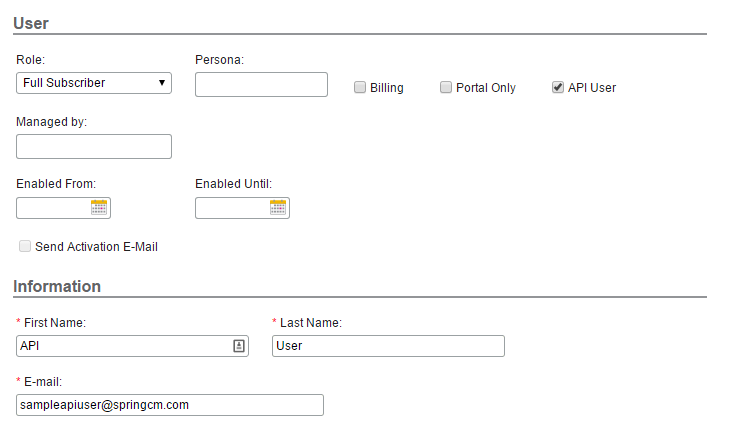
API User Authentication flow is intended to be used by back end batch operations for which there is not an end user that authenticates to the API. With API user authentication, a client id is mapped to an API user and then is used in place of a Docusign CLM refresh token to obtain a Docusign CLM API access token. To use this form of authentication the following setup is required:
1. An API User is created in the Docusign CLM address book and given the desired role and security groups needed for the API calls. Note that once a user is made an API user, it cannot be undone, so actual users of the Docusign CLM application should never be created as an API user.
2. The API user is mapped to a client id in Docusign CLM Preferences. To create the mapping, navigate to **Preferences->REST API** in the Docusign CLM user interface. In the **API User Mappings** section your client id can be mapped to the API user created in Step 1. Note that a single Client Id can be mapped to one and only one API User.
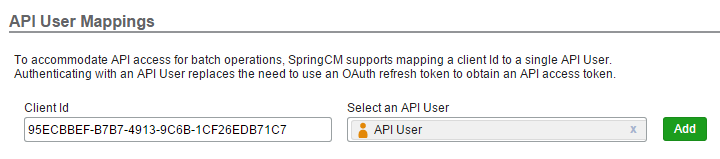
After the mapping is created, API user authentication can be used by posting the mapped client id along with the corresponding client secret to the API User Authentication Endpoint. The access token endpoint for the API User Authentication Flow and sample JSON request/response are shown below:
> **Production API User Authentication Endpoint**
>
> ```
> https://auth.springcm.com/api/v201606/apiuser
> ```
>
> **UAT API User Authentication Endpoint**
>
> ```
> https://authuat.springcm.com/api/v201606/apiuser
> ```
>
> The access token can now be used to access the API. It must be passed in the Authorization header for all calls to the Object, Task and Content API. When passing it must be prefixed with “bearer” as shown below:
> `Authorization: bearer [your access token]`
- Example request
- Example response
1
2
3
4
5
6
7
headers:Accept:'application/json',
Content-Type: application/json
uri:https://auth.springcm.com/api/v201606/
apiuser
method:POST
{
"client\_id":\[ClientId mapped to an API\
\
User\],
"client\_secret":\[Client secret pair for\
\
the ClientId\]
}
[\\
\\
Platform 101\\
\\
Get up to speed on our concepts and platform](https://developers.docusign.com/platform/build-integration/) [Learn More](https://developers.docusign.com/platform/build-integration/)[\\
\\
Docusign Community\\
\\
Get answers from our API experts and community](https://community.docusign.com/developer-59) [Learn More](https://community.docusign.com/developer-59)[\\
\\
GitHub\\
\\
Find our SDKs and other source code](https://github.com/docusign) [Learn More](https://github.com/docusign)[\\
\\
Partner Directory\\
\\
See the full directory of Docusign partners](https://partners.docusign.com/s/partnerfinder) [Learn More](https://partners.docusign.com/s/partnerfinder)
[](https://docusign.com/)
[](https://x.com/DocusignDevs)[](https://www.youtube.com/@DocusignDevs)[](https://www.linkedin.com/showcase/docusigndevs/)
APIs- [eSignature API](https://developers.docusign.com/docs/esign-rest-api/)
- [Web Forms API](https://developers.docusign.com/docs/web-forms-api/)
- [Maestro API](https://developers.docusign.com/docs/maestro-api/)
- [Navigator API](https://developers.docusign.com/docs/navigator-api/)
- [Docusign Admin API](https://developers.docusign.com/docs/admin-api/)
- [View all](https://developers.docusign.com/docs/)
Featured Content- [Quickstart](https://developers.docusign.com/docs/esign-rest-api/quickstart/)
- [Sample Apps](https://developers.docusign.com/sample-apps/)
- [Authentication](https://developers.docusign.com/platform/auth/)
- [Webhooks](https://developers.docusign.com/platform/webhooks/)
- [Go-Live](https://developers.docusign.com/platform/go-live/)
- [SDKs](https://developers.docusign.com/docs/sdks/)
Help- [Support](https://developers.docusign.com/support/)
- [FAQs](https://support.docusign.com/s/articles/DocuSign-Developer-Support-FAQs)
More- [Partner With Us](https://developers.docusign.com/partner/)
- [Docusign University](https://developers.docusign.com/training/)
- [Trust Center](https://www.docusign.com/trust)
- [Trust Portal](https://www.docusign.com/trust-portal)
- [ISV integration guides](https://developers.docusign.com/partner/isv-integration-guides/)
[](https://x.com/DocusignDevs)[](https://www.youtube.com/@DocusignDevs)[](https://www.linkedin.com/showcase/docusigndevs/)
© 2024 Docusign, Inc.
[Docusign.com](https://docusign.com/)
[Terms of Use](https://www.docusign.com/company/terms-and-conditions/developers)
[Privacy Notice](https://www.docusign.com/company/privacy-policy)
[Notice to California Residents](https://www.docusign.com/privacy#8)
[Intellectual Property](https://www.docusign.com/IP)
Your Privacy Choices

## SOAP to REST Migration
[CLM.CM API](https://developers.docusign.com/docs/clm-api/clm.cm/)
[Overview](https://developers.docusign.com/docs/clm-api/clm.cm/)
[CLM.CM API 101](https://developers.docusign.com/docs/clm-api/clm.cm/clm101/)
[Getting Started](https://developers.docusign.com/docs/clm-api/clm.cm/clm101/)
[Overview](https://developers.docusign.com/docs/clm-api/clm.cm/clm101/overview/)
[Response and Error Codes](https://developers.docusign.com/docs/clm-api/clm.cm/clm101/response-and-error-codes/)
[Rate Limits](https://developers.docusign.com/docs/clm-api/clm.cm/clm101/rate-limits/)
[Authentication: Overview](https://developers.docusign.com/docs/clm-api/clm.cm/clm101/authentication/)
[Authentication: OAuth 2.0 Web Server Flow](https://developers.docusign.com/docs/clm-api/clm.cm/clm101/authentication/oauth2-web-server-flow/)
[Authentication: Salesforce Client Flow](https://developers.docusign.com/docs/clm-api/clm.cm/clm101/authentication/salesforce-client-flow/)
[Authentication: API User Authentication Flow](https://developers.docusign.com/docs/clm-api/clm.cm/clm101/authentication/api-user-authentication-flow/)
[Object API](https://developers.docusign.com/docs/clm-api/clm.cm/clm101/object-api/)
[Task API](https://developers.docusign.com/docs/clm-api/clm.cm/clm101/task-api/)
[Content API](https://developers.docusign.com/docs/clm-api/clm.cm/clm101/content-api/)
[Cross-Origin Resource Sharing (CORS)](https://developers.docusign.com/docs/clm-api/clm.cm/clm101/cross-origin-resource-sharing/)
[Migrating from the SOAP API to the REST API](https://developers.docusign.com/docs/clm-api/clm.cm/clm101/migrating-soap-to-rest/)
[CLM.CM API Reference](https://apidocsna11.springcm.com/apidocs)
Migrating from the SOAP API to the REST API
[CLM.CM API](https://developers.docusign.com/docs/clm-api/clm.cm/)
[Overview](https://developers.docusign.com/docs/clm-api/clm.cm/)
[CLM.CM API 101](https://developers.docusign.com/docs/clm-api/clm.cm/clm101/)
[Getting Started](https://developers.docusign.com/docs/clm-api/clm.cm/clm101/)
[Overview](https://developers.docusign.com/docs/clm-api/clm.cm/clm101/overview/)
[Response and Error Codes](https://developers.docusign.com/docs/clm-api/clm.cm/clm101/response-and-error-codes/)
[Rate Limits](https://developers.docusign.com/docs/clm-api/clm.cm/clm101/rate-limits/)
[Authentication: Overview](https://developers.docusign.com/docs/clm-api/clm.cm/clm101/authentication/)
[Authentication: OAuth 2.0 Web Server Flow](https://developers.docusign.com/docs/clm-api/clm.cm/clm101/authentication/oauth2-web-server-flow/)
[Authentication: Salesforce Client Flow](https://developers.docusign.com/docs/clm-api/clm.cm/clm101/authentication/salesforce-client-flow/)
[Authentication: API User Authentication Flow](https://developers.docusign.com/docs/clm-api/clm.cm/clm101/authentication/api-user-authentication-flow/)
[Object API](https://developers.docusign.com/docs/clm-api/clm.cm/clm101/object-api/)
[Task API](https://developers.docusign.com/docs/clm-api/clm.cm/clm101/task-api/)
[Content API](https://developers.docusign.com/docs/clm-api/clm.cm/clm101/content-api/)
[Cross-Origin Resource Sharing (CORS)](https://developers.docusign.com/docs/clm-api/clm.cm/clm101/cross-origin-resource-sharing/)
[Migrating from the SOAP API to the REST API](https://developers.docusign.com/docs/clm-api/clm.cm/clm101/migrating-soap-to-rest/)
[CLM.CM API Reference](https://apidocsna11.springcm.com/apidocs)
# Migrating from the SOAP API to the CLM API
Developing with the CLM API is only available for CLM customers with a production account. To purchase a plan to gain access to the CLM API, [contact Docusign Sales](https://www.docusign.com/contact-sales).
If you are already using the SpringCM SOAP API, this page will help you map your existing code if you choose to transition to the CLM API. The following table shows the equivalent REST API calls for a given SOAP call. The CLM API also includes additional functionality that is not exposed in the SOAP API.SOAP API calls not listed here are either deprecated or scheduled to be upgraded in a future release.
| SOAP API | REST API |
| --- | --- |
| AccountGetCurrent | GET /{apiversion}/accounts/current
See also: [Get the account of the current user](https://apidocsna11.springcm.com/apidocs#!/Accounts/Accounts_Get) |
| Authenticate | See the [REST API Authentication](https://developers.docusign.com/docs/clm-api/clm.cm/clm101/authentication/) section |
| AuthenticateNonDefault | See the [REST API Authentication](https://developers.docusign.com/docs/clm-api/clm.cm/clm101/authentication/) section |
| AuthenticateSSO | See [Salesforce Client Flow Authentication](https://developers.docusign.com/docs/clm-api/clm.cm/clm101/authentication/salesforce-client-flow/) section |
| BPMAbortWorkflow | DELETE /{apiversion}/workflows/{instanceId}
See also: [Stop a workflow instance](https://apidocsna11.springcm.com/apidocs#!/Workflows/Workflows_Delete) |
| BPMInitiateWorkflow | POST /{apiversion}/workflows
See also: [Start a workflow instance](https://apidocsna11.springcm.com/apidocs#!/Workflows/Workflows_Post)
Pass the data to start the workflow in the Params property |
| BPMInitiateWorkflowWithDocuments | POST /{apiversion}/workflows
See also: [Start a workflow instance](https://apidocsna11.springcm.com/apidocs#!/Workflows/Workflows_Post)
Pass the data to start the workflow in the WorkflowDocuments collection property |
| BPMSignalWorkflow | POST /{apiversion}/workflows/{instanceId}/signal
See also: [Signal a workflow](https://apidocsna11.springcm.com/apidocs#!/Workflows/Workflows_PostSignal) |
| BPMWorkflowInstanceInformation | GET /{apiversion}/workflows/{instanceId}
See also: [Get a workflow instance](https://apidocsna11.springcm.com/apidocs#!/Workflows/Workflows_Get) |
| ContactFind | GET /{apiversion}/contacts
Filterable on Email, First Name, Last Name, Company
See also: [Get the contacts of the current account](https://apidocsna11.springcm.com/apidocs#!/Contacts/Contacts_GetAllContacts) |
| Copy | POST /{apiversion}/copytasks
See also: [CopyTasks](https://apidocsna11.springcm.com/apidocs#!/CopyTasks) |
| Delete
DeleteBaseObjects | Use the DELETE method on the specific object HREF. Will vary for object type:
[Contacts](https://apidocsna11.springcm.com/apidocs#!/Contacts/Contacts_Delete)– DELETE /{apiversion}/contacts/{id}
[Documents](https://apidocsna11.springcm.com/apidocs#!/Documents/Documents_DeleteDocument)– DELETE /{apiversion}/documents/{id}
[Folders](https://apidocsna11.springcm.com/apidocs#!/Folders/Folders_Delete)– DELETE /{apiversion}/folders/{id}
[Groups](https://apidocsna11.springcm.com/apidocs#!/Groups/Groups_Delete)– DELETE /{apiversion}/groups/{id}
[Users](https://apidocsna11.springcm.com/apidocs#!/Users/Users_Delete)– DELETE /{apiversion}/users/{id} |
| DocumentCheckin
DocumentCheckout
DocumentCheckoutCancel | Working with checkins and checkouts without versioning the content is done with the “lock” object. Document objects will always have one and only one “lock” object that manages the document checkin/checkout.
See the [Content API](https://developers.docusign.com/docs/clm-api/clm.cm/clm101/content-api/) documentation for details on working with the lock object as well as the [Document](https://apidocsna11.springcm.com/apidocs#!/Documents) object method level documentation |
| DocumentCreateBeginWithFolder
DocumentCreateCancel
DocumentCreateCheckin
DocumentCreateCommit
DocumentCreateFilesBegin
DocumentCreateFilesCommit
DocumentCreateUploadChunk | See the [Content API](https://developers.docusign.com/docs/clm-api/clm.cm/clm101/content-api/) documentation for information on uploading new documents. |
| DocumentDownload
DocumentDownloadPreviewImage
DocumentGetExtractedText
DocumentHash | See the [Content API](https://developers.docusign.com/docs/clm-api/clm.cm/clm101/content-api/) documentation for information on downloading documents in various supported formats. |
| DocumentGetById | GET /{apiversion}/documents/{id}
See also: [Get a document by ID](https://apidocsna11.springcm.com/apidocs#!/Documents/Documents_Get) |
| DocumentGetPath | GET /{apiversion}/documents?path={path to document}
See also: [Get a document by path](https://apidocsna11.springcm.com/apidocs#!/Documents/Documents_GetByPath) |
| DocumentHistoryGetById | GET /{apiversion}/documents/{id}?expand=historyitems
GET /{apiversion}/documents/{id}/historyitems
See also: [Get the history of a document](https://apidocsna11.springcm.com/apidocs#!/Documents/Documents_GetHistoryItems) |
| DocumentMerge
DocumentMergeCheck
DocumentMergeDownload | POST /{apiversion}/documentmergetasks
See also: [DocumentMergeTasks](https://apidocsna11.springcm.com/apidocs#!/DocumentMergeTasks) |
| DocumentPagedSearch
DocumentSearch | POST /{apiversion}/documentsearchtasks
See also: [DocumentSearchTasks](https://apidocsna11.springcm.com/apidocs#!/DocumentSearchTasks) |
| DocumentPublish | POST /{apiversion}/sharelinks
DocumentPublish is deprecated. The [Sharelinks](https://apidocsna11.springcm.com/apidocs#!/ShareLinks) object should be used instead. |
| DocumentSave | PUT /{apiversion}/documents/{id}
PATCH /{apiversion}/documents/{id}
See also: [PUT - Update a document](https://apidocsna11.springcm.com/apidocs#!/Documents/Documents_Put), [PATCH - Update a document](https://apidocsna11.springcm.com/apidocs#!/Documents/Documents_Patch) |
| DocumentSendForSignature
DocumentSendForSignatureCancel
DocumentSendForSignatureStatus | POST /{apiversion}/signaturetasks
See also: [SignatureTasks](https://apidocsna11.springcm.com/apidocs#!/SignatureTasks) |
| DocumentSplit | POST /{apiversion}/splitdocumenttasks
See also: [SplitDocumentTasks](https://apidocsna11.springcm.com/apidocs#!/SplitDocumentTasks) |
| DocumentXMLMerge
DocumentXMLMergeStatus | POST /{apiversion}/documentxmlmergetasks
See also: [DocumentXmlMergeTasks](https://apidocsna11.springcm.com/apidocs#!/DocumentXmlMergeTasks) |
| FindOrCreateEOSFolder | POST /{apiversion}/folders
Must supply the EOSInfo object as child on the posted Folder object
The REST API also supports a method to find an EOS Folder that will not create the folder if it is not found:
GET /{apiversion}/folders?eosObjectType={EOS object type}&eosObjectId={EOS Object Id}
See also: [Create a folder](https://apidocsna11.springcm.com/apidocs#!/Folders/Folders_Post), [Get a folder by EOS object id and type](https://apidocsna11.springcm.com/apidocs#!/Folders/Folders_GetByEos) |
| FolderArchive
FolderArchiveDownload
FolderArchiveGetStatus | POST /{apiversion}/folderarchivetasks
See also: [FolderArchiveTasks](https://apidocsna11.springcm.com/apidocs#!/FolderArchiveTasks) |
| FolderCreate | POST /{apiversion}/folders
See also: [Create a folder](https://apidocsna11.springcm.com/apidocs#!/Folders/Folders_Post) |
| FolderGetById | GET /{apiversion}/folders/{id}
See also: [Get a folder by ID](https://apidocsna11.springcm.com/apidocs#!/Folders/Folders_Get) |
| FolderGetContents
SystemFolderGetContents | GET /{apiversion}/folders/{id}?expand=documents,folders
GET /{apiversion}/folders/{id}/documents
GET /{apiversion}/folders/{id}/folders
See also: [Get the documents in a folder](https://apidocsna11.springcm.com/apidocs#!/Folders/Folders_GetDocuments), [Get the folders in a folder](https://apidocsna11.springcm.com/apidocs#!/Folders/Folders_GetChildFolders) |
| FolderGetPath | GET /{apiversion}/folders/{id}?expand=path
See also: [Get a folder by path or system folder](https://apidocsna11.springcm.com/apidocs#!/Folders/Folders_GetByPathOrSystemFolder) |
| FolderPagedSearch
FolderSearch | /POST /{apiversion/foldersearchtasks
See also: [FolderSearchTasks](https://apidocsna11.springcm.com/apidocs#!/FolderSearchTasks) |
| FolderSave | PUT /{apiversion}/folders/{id}
PATCH /{apiversion}/folders/{id}
See also: [PUT - Update a folder](https://apidocsna11.springcm.com/apidocs#!/Folders/Folders_Put), [PATCH - Update a folder](https://apidocsna11.springcm.com/apidocs#!/Folders/Folders_Patch) |
| GetDocumentRevisions | GET /{apiversion}/documents/{id}?expand=versions
GET /{apiversion}/documents/{id}/versions
See also: [Get the versions of a document](https://apidocsna11.springcm.com/apidocs#!/Documents/Documents_GetVersions) |
| GetMetadataFields | GET /{apiversion}/attributegroups/{id}
See also: [Get an attribute group](https://apidocsna11.springcm.com/apidocs#!/AttributeGroups/AttributeGroups_Get) |
| GetMetadataGroups | GET /{apiversion}/accounts/current/attributegroups
See also: [Get the attribute groups of the current account](https://apidocsna11.springcm.com/apidocs#!/Accounts/Accounts_GetAttributeGroups) |
| GetRecentlyAccessedDocuments | GET /{apiversion}/users/current/recentdocuments
See also: [Get the recently accessed documents for the current user](https://apidocsna11.springcm.com/apidocs#!/Users/Users_GetRecentDocumentsCurrent) |
| GroupFind | GET /{apiversion}/groups
Filterable on Name, GroupType
See also: [Get the groups in the current account](https://apidocsna11.springcm.com/apidocs#!/Groups/Groups_GetAllGroups) |
| GroupGetByContact | GET /{apiversion}/users/current?expand=groups
GET /{apiversion}/users/current/groups
See also: [Get the groups of the current user](https://apidocsna11.springcm.com/apidocs#!/Users/Users_GetGroupsCurrent) |
| ImportSalesforceAttachments
ImportSalesforceAttachmentsStatus | POST /{apiversion}/salesforceattachmentimportasks
See also: [SalesforceAttachmentImportTasks](https://apidocsna11.springcm.com/apidocs#!/SalesforceAttachmentImportTasks) |
| Load | There is no generic load in the REST API. Use GET requests to an object endpoint to load an object. |
| Move | There is no specific move task in the REST API. To move a document or folder in the REST API, change the parent folder on the object and PUT/PATCH the document or folder. |
| ParsePath | No exact match in the REST API, but the same functionality can be obtained by first trying the document endpoint as a path, if it’s not found, try the path at the folder endpoint. |
| Save | There is no bulk save in the REST API. PUT/PATCH to a specific object endpoint to save an object. |
| SetPermission | POST /{apiversion}/changesecuritytasks
See also: [ChangeSecurityTasks](https://apidocsna11.springcm.com/apidocs#!/ChangeSecurityTasks) |
| UserGetByAccountId | GET /{apiversion}/users
See also: [Get the users in the current account](https://apidocsna11.springcm.com/apidocs#!/Users/Users_GetUsers) |
[\\
\\
Platform 101\\
\\
Get up to speed on our concepts and platform](https://developers.docusign.com/platform/build-integration/) [Learn More](https://developers.docusign.com/platform/build-integration/)[\\
\\
Docusign Community\\
\\
Get answers from our API experts and community](https://community.docusign.com/developer-59) [Learn More](https://community.docusign.com/developer-59)[\\
\\
GitHub\\
\\
Find our SDKs and other source code](https://github.com/docusign) [Learn More](https://github.com/docusign)[\\
\\
Partner Directory\\
\\
See the full directory of Docusign partners](https://partners.docusign.com/s/partnerfinder) [Learn More](https://partners.docusign.com/s/partnerfinder)
[](https://docusign.com/)
[](https://x.com/DocusignDevs)[](https://www.youtube.com/@DocusignDevs)[](https://www.linkedin.com/showcase/docusigndevs/)
APIs- [eSignature API](https://developers.docusign.com/docs/esign-rest-api/)
- [Web Forms API](https://developers.docusign.com/docs/web-forms-api/)
- [Maestro API](https://developers.docusign.com/docs/maestro-api/)
- [Navigator API](https://developers.docusign.com/docs/navigator-api/)
- [Docusign Admin API](https://developers.docusign.com/docs/admin-api/)
- [View all](https://developers.docusign.com/docs/)
Featured Content- [Quickstart](https://developers.docusign.com/docs/esign-rest-api/quickstart/)
- [Sample Apps](https://developers.docusign.com/sample-apps/)
- [Authentication](https://developers.docusign.com/platform/auth/)
- [Webhooks](https://developers.docusign.com/platform/webhooks/)
- [Go-Live](https://developers.docusign.com/platform/go-live/)
- [SDKs](https://developers.docusign.com/docs/sdks/)
Help- [Support](https://developers.docusign.com/support/)
- [FAQs](https://support.docusign.com/s/articles/DocuSign-Developer-Support-FAQs)
More- [Partner With Us](https://developers.docusign.com/partner/)
- [Docusign University](https://developers.docusign.com/training/)
- [Trust Center](https://www.docusign.com/trust)
- [Trust Portal](https://www.docusign.com/trust-portal)
- [ISV integration guides](https://developers.docusign.com/partner/isv-integration-guides/)
[](https://x.com/DocusignDevs)[](https://www.youtube.com/@DocusignDevs)[](https://www.linkedin.com/showcase/docusigndevs/)
© 2024 Docusign, Inc.
[Docusign.com](https://docusign.com/)
[Terms of Use](https://www.docusign.com/company/terms-and-conditions/developers)
[Privacy Notice](https://www.docusign.com/company/privacy-policy)
[Notice to California Residents](https://www.docusign.com/privacy#8)
[Intellectual Property](https://www.docusign.com/IP)
Your Privacy Choices

## CLM.CM API Overview
[CLM.CM API](https://developers.docusign.com/docs/clm-api/clm.cm/)
[Overview](https://developers.docusign.com/docs/clm-api/clm.cm/)
[CLM.CM API 101](https://developers.docusign.com/docs/clm-api/clm.cm/clm101/)
[Getting Started](https://developers.docusign.com/docs/clm-api/clm.cm/clm101/)
[Overview](https://developers.docusign.com/docs/clm-api/clm.cm/clm101/overview/)
[Response and Error Codes](https://developers.docusign.com/docs/clm-api/clm.cm/clm101/response-and-error-codes/)
[Rate Limits](https://developers.docusign.com/docs/clm-api/clm.cm/clm101/rate-limits/)
[Authentication: Overview](https://developers.docusign.com/docs/clm-api/clm.cm/clm101/authentication/)
[Authentication: OAuth 2.0 Web Server Flow](https://developers.docusign.com/docs/clm-api/clm.cm/clm101/authentication/oauth2-web-server-flow/)
[Authentication: Salesforce Client Flow](https://developers.docusign.com/docs/clm-api/clm.cm/clm101/authentication/salesforce-client-flow/)
[Authentication: API User Authentication Flow](https://developers.docusign.com/docs/clm-api/clm.cm/clm101/authentication/api-user-authentication-flow/)
[Object API](https://developers.docusign.com/docs/clm-api/clm.cm/clm101/object-api/)
[Task API](https://developers.docusign.com/docs/clm-api/clm.cm/clm101/task-api/)
[Content API](https://developers.docusign.com/docs/clm-api/clm.cm/clm101/content-api/)
[Cross-Origin Resource Sharing (CORS)](https://developers.docusign.com/docs/clm-api/clm.cm/clm101/cross-origin-resource-sharing/)
[Migrating from the SOAP API to the REST API](https://developers.docusign.com/docs/clm-api/clm.cm/clm101/migrating-soap-to-rest/)
[CLM.CM API Reference](https://apidocsna11.springcm.com/apidocs)
CLM.CM API 101
[CLM.CM API](https://developers.docusign.com/docs/clm-api/clm.cm/)
[Overview](https://developers.docusign.com/docs/clm-api/clm.cm/)
[CLM.CM API 101](https://developers.docusign.com/docs/clm-api/clm.cm/clm101/)
[Getting Started](https://developers.docusign.com/docs/clm-api/clm.cm/clm101/)
[Overview](https://developers.docusign.com/docs/clm-api/clm.cm/clm101/overview/)
[Response and Error Codes](https://developers.docusign.com/docs/clm-api/clm.cm/clm101/response-and-error-codes/)
[Rate Limits](https://developers.docusign.com/docs/clm-api/clm.cm/clm101/rate-limits/)
[Authentication: Overview](https://developers.docusign.com/docs/clm-api/clm.cm/clm101/authentication/)
[Authentication: OAuth 2.0 Web Server Flow](https://developers.docusign.com/docs/clm-api/clm.cm/clm101/authentication/oauth2-web-server-flow/)
[Authentication: Salesforce Client Flow](https://developers.docusign.com/docs/clm-api/clm.cm/clm101/authentication/salesforce-client-flow/)
[Authentication: API User Authentication Flow](https://developers.docusign.com/docs/clm-api/clm.cm/clm101/authentication/api-user-authentication-flow/)
[Object API](https://developers.docusign.com/docs/clm-api/clm.cm/clm101/object-api/)
[Task API](https://developers.docusign.com/docs/clm-api/clm.cm/clm101/task-api/)
[Content API](https://developers.docusign.com/docs/clm-api/clm.cm/clm101/content-api/)
[Cross-Origin Resource Sharing (CORS)](https://developers.docusign.com/docs/clm-api/clm.cm/clm101/cross-origin-resource-sharing/)
[Migrating from the SOAP API to the REST API](https://developers.docusign.com/docs/clm-api/clm.cm/clm101/migrating-soap-to-rest/)
[CLM.CM API Reference](https://apidocsna11.springcm.com/apidocs)
# Getting Started
Developing with the CLM API is only available for CLM customers with a production account. To purchase a plan to gain access to the CLM API, [contact Docusign Sales](https://www.docusign.com/contact-sales).
The Docusign CLM API enables developers to interact with Docusign CLM documents, data, and services. Most objects and services available in the Docusign CLM user interface are supported in the API. For additional issues or requests, visit the Docusign Support Center at [https://support.docusign.com](https://support.docusign.com/).
The Docusign CLM API contains authentication functionality and 3 logical sub APIs for programmatically working with Docusign CLM functionality:
- [Object API](https://developers.docusign.com/docs/clm-api/clm.cm/clm101/object-api/) – API methods that exposes create, read, update and delete functionality for Docusign CLM objects.
- [Task API](https://developers.docusign.com/docs/clm-api/clm.cm/clm101/task-api/) – API methods that expose Docusign CLM services that are invoked as asynchronous tasks
- [Content API](https://developers.docusign.com/docs/clm-api/clm.cm/clm101/content-api/) – API methods for uploading, downloading and versioning documents in Docusign CLM
[\\
\\
Platform 101\\
\\
Get up to speed on our concepts and platform](https://developers.docusign.com/platform/build-integration/) [Learn More](https://developers.docusign.com/platform/build-integration/)[\\
\\
Docusign Community\\
\\
Get answers from our API experts and community](https://community.docusign.com/developer-59) [Learn More](https://community.docusign.com/developer-59)[\\
\\
GitHub\\
\\
Find our SDKs and other source code](https://github.com/docusign) [Learn More](https://github.com/docusign)[\\
\\
Partner Directory\\
\\
See the full directory of Docusign partners](https://partners.docusign.com/s/partnerfinder) [Learn More](https://partners.docusign.com/s/partnerfinder)
[](https://docusign.com/)
[](https://x.com/DocusignDevs)[](https://www.youtube.com/@DocusignDevs)[](https://www.linkedin.com/showcase/docusigndevs/)
APIs- [eSignature API](https://developers.docusign.com/docs/esign-rest-api/)
- [Web Forms API](https://developers.docusign.com/docs/web-forms-api/)
- [Maestro API](https://developers.docusign.com/docs/maestro-api/)
- [Navigator API](https://developers.docusign.com/docs/navigator-api/)
- [Docusign Admin API](https://developers.docusign.com/docs/admin-api/)
- [View all](https://developers.docusign.com/docs/)
Featured Content- [Quickstart](https://developers.docusign.com/docs/esign-rest-api/quickstart/)
- [Sample Apps](https://developers.docusign.com/sample-apps/)
- [Authentication](https://developers.docusign.com/platform/auth/)
- [Webhooks](https://developers.docusign.com/platform/webhooks/)
- [Go-Live](https://developers.docusign.com/platform/go-live/)
- [SDKs](https://developers.docusign.com/docs/sdks/)
Help- [Support](https://developers.docusign.com/support/)
- [FAQs](https://support.docusign.com/s/articles/DocuSign-Developer-Support-FAQs)
More- [Partner With Us](https://developers.docusign.com/partner/)
- [Docusign University](https://developers.docusign.com/training/)
- [Trust Center](https://www.docusign.com/trust)
- [Trust Portal](https://www.docusign.com/trust-portal)
- [ISV integration guides](https://developers.docusign.com/partner/isv-integration-guides/)
[](https://x.com/DocusignDevs)[](https://www.youtube.com/@DocusignDevs)[](https://www.linkedin.com/showcase/docusigndevs/)
© 2024 Docusign, Inc.
[Docusign.com](https://docusign.com/)
[Terms of Use](https://www.docusign.com/company/terms-and-conditions/developers)
[Privacy Notice](https://www.docusign.com/company/privacy-policy)
[Notice to California Residents](https://www.docusign.com/privacy#8)
[Intellectual Property](https://www.docusign.com/IP)
Your Privacy Choices

## CLM.CM API Overview
[CLM.CM API](https://developers.docusign.com/docs/clm-api/clm.cm/)
[Overview](https://developers.docusign.com/docs/clm-api/clm.cm/)
[CLM.CM API 101](https://developers.docusign.com/docs/clm-api/clm.cm/clm101/)
[Getting Started](https://developers.docusign.com/docs/clm-api/clm.cm/clm101/)
[Overview](https://developers.docusign.com/docs/clm-api/clm.cm/clm101/overview/)
[Response and Error Codes](https://developers.docusign.com/docs/clm-api/clm.cm/clm101/response-and-error-codes/)
[Rate Limits](https://developers.docusign.com/docs/clm-api/clm.cm/clm101/rate-limits/)
[Authentication: Overview](https://developers.docusign.com/docs/clm-api/clm.cm/clm101/authentication/)
[Authentication: OAuth 2.0 Web Server Flow](https://developers.docusign.com/docs/clm-api/clm.cm/clm101/authentication/oauth2-web-server-flow/)
[Authentication: Salesforce Client Flow](https://developers.docusign.com/docs/clm-api/clm.cm/clm101/authentication/salesforce-client-flow/)
[Authentication: API User Authentication Flow](https://developers.docusign.com/docs/clm-api/clm.cm/clm101/authentication/api-user-authentication-flow/)
[Object API](https://developers.docusign.com/docs/clm-api/clm.cm/clm101/object-api/)
[Task API](https://developers.docusign.com/docs/clm-api/clm.cm/clm101/task-api/)
[Content API](https://developers.docusign.com/docs/clm-api/clm.cm/clm101/content-api/)
[Cross-Origin Resource Sharing (CORS)](https://developers.docusign.com/docs/clm-api/clm.cm/clm101/cross-origin-resource-sharing/)
[Migrating from the SOAP API to the REST API](https://developers.docusign.com/docs/clm-api/clm.cm/clm101/migrating-soap-to-rest/)
[CLM.CM API Reference](https://apidocsna11.springcm.com/apidocs)
Overview
[CLM.CM API](https://developers.docusign.com/docs/clm-api/clm.cm/)
[Overview](https://developers.docusign.com/docs/clm-api/clm.cm/)
[CLM.CM API 101](https://developers.docusign.com/docs/clm-api/clm.cm/clm101/)
[Getting Started](https://developers.docusign.com/docs/clm-api/clm.cm/clm101/)
[Overview](https://developers.docusign.com/docs/clm-api/clm.cm/clm101/overview/)
[Response and Error Codes](https://developers.docusign.com/docs/clm-api/clm.cm/clm101/response-and-error-codes/)
[Rate Limits](https://developers.docusign.com/docs/clm-api/clm.cm/clm101/rate-limits/)
[Authentication: Overview](https://developers.docusign.com/docs/clm-api/clm.cm/clm101/authentication/)
[Authentication: OAuth 2.0 Web Server Flow](https://developers.docusign.com/docs/clm-api/clm.cm/clm101/authentication/oauth2-web-server-flow/)
[Authentication: Salesforce Client Flow](https://developers.docusign.com/docs/clm-api/clm.cm/clm101/authentication/salesforce-client-flow/)
[Authentication: API User Authentication Flow](https://developers.docusign.com/docs/clm-api/clm.cm/clm101/authentication/api-user-authentication-flow/)
[Object API](https://developers.docusign.com/docs/clm-api/clm.cm/clm101/object-api/)
[Task API](https://developers.docusign.com/docs/clm-api/clm.cm/clm101/task-api/)
[Content API](https://developers.docusign.com/docs/clm-api/clm.cm/clm101/content-api/)
[Cross-Origin Resource Sharing (CORS)](https://developers.docusign.com/docs/clm-api/clm.cm/clm101/cross-origin-resource-sharing/)
[Migrating from the SOAP API to the REST API](https://developers.docusign.com/docs/clm-api/clm.cm/clm101/migrating-soap-to-rest/)
[CLM.CM API Reference](https://apidocsna11.springcm.com/apidocs)
# Overview
Developing with the CLM API is only available for CLM customers with a production account. To purchase a plan to gain access to the CLM API, [contact Docusign Sales](https://www.docusign.com/contact-sales).
## API Base URLs
All API URLs use the following format:
> ```
> https://[base url]/[version]/[resource identifier]
> ```
Docusign CLM is distributed across several data centers. Base URLs for the Object, Task and Content APIs are data center specific. Base URLs for authentication are NOT data center specific. To prevent developers from having to store base URL information in their application code, the base URL for the Object and Task APIs is returned after a successful authentication request. Content API URLs are properties of the Document and Folder objects and are discoverable at run time.
The entry point for authentication regardless of data center is as follows:
> **Production Authentication Endpoint**
>
> ```
> https://auth.springcm.com
> ```
>
> **UAT Authentication Endpoint**
>
> ```
> https://authuat.springcm.com
> ```
As mentioned above, datacenter specific base URLs are passed back from a successful authentication call, however the URLs are also listed below for reference purposes. Note the datacenter of an account can be obtained by looking at the subdomain of the URL after logging into the Docusign CLM user interface (ie na11, na21, etc.). Additionally, the Docusign CLM API base URLs can be found within the Docusign CLM user interface by navigating to: **Help->SpringCM Resources**
## Production Endpoints
> **Production Object API**
>
> ```
> https://api[datacenter].springcm.com
> ```
>
> **Production Task API**
>
> ```
> https://api[datacenter].springcm.com
> ```
>
> **Production Content Upload API**
>
> ```
> https://apiupload[datacenter].springcm.com
> ```
>
> **Production Content Download API**
>
> ```
> https://apidownload[datacenter].springcm.com
> ```
## UAT Endpoints
> **UAT Object API**
>
> ```
> https://apiuat[datacenter].springcm.com
> ```
>
> **UAT Task API**
>
> ```
> https://apiuat[datacenter].springcm.com
> ```
>
> **UAT Content Upload API**
>
> ```
> https://apiuploaduat[datacenter].springcm.com
> ```
>
> **UAT Content Download API**
>
> ```
> https://apidownloaduat[datacenter].springcm.com
> ```
## Versioning
The authentication and application URLs are versioned separately. The current versions are:
> **Authentication Current Version**
>
> ```
> v201606
> ```
>
> **Application APIs Current Version**
>
> ```
> v201411
> ```
## Request/Response Formats
The Docusign CLM Object and Task APIs support JSON for all requests and responses. The Content API by default will download documents in the native format they were uploaded. For certain document types, Docusign CLM will also maintain a copy of the document in additional formats such as PDF, png, or text. See the [Content API](https://developers.docusign.com/docs/clm-api/clm.cm/clm101/content-api/) documentation for more information.
[\\
\\
Platform 101\\
\\
Get up to speed on our concepts and platform](https://developers.docusign.com/platform/build-integration/) [Learn More](https://developers.docusign.com/platform/build-integration/)[\\
\\
Docusign Community\\
\\
Get answers from our API experts and community](https://community.docusign.com/developer-59) [Learn More](https://community.docusign.com/developer-59)[\\
\\
GitHub\\
\\
Find our SDKs and other source code](https://github.com/docusign) [Learn More](https://github.com/docusign)[\\
\\
Partner Directory\\
\\
See the full directory of Docusign partners](https://partners.docusign.com/s/partnerfinder) [Learn More](https://partners.docusign.com/s/partnerfinder)
[](https://docusign.com/)
[](https://x.com/DocusignDevs)[](https://www.youtube.com/@DocusignDevs)[](https://www.linkedin.com/showcase/docusigndevs/)
APIs- [eSignature API](https://developers.docusign.com/docs/esign-rest-api/)
- [Web Forms API](https://developers.docusign.com/docs/web-forms-api/)
- [Maestro API](https://developers.docusign.com/docs/maestro-api/)
- [Navigator API](https://developers.docusign.com/docs/navigator-api/)
- [Docusign Admin API](https://developers.docusign.com/docs/admin-api/)
- [View all](https://developers.docusign.com/docs/)
Featured Content- [Quickstart](https://developers.docusign.com/docs/esign-rest-api/quickstart/)
- [Sample Apps](https://developers.docusign.com/sample-apps/)
- [Authentication](https://developers.docusign.com/platform/auth/)
- [Webhooks](https://developers.docusign.com/platform/webhooks/)
- [Go-Live](https://developers.docusign.com/platform/go-live/)
- [SDKs](https://developers.docusign.com/docs/sdks/)
Help- [Support](https://developers.docusign.com/support/)
- [FAQs](https://support.docusign.com/s/articles/DocuSign-Developer-Support-FAQs)
More- [Partner With Us](https://developers.docusign.com/partner/)
- [Docusign University](https://developers.docusign.com/training/)
- [Trust Center](https://www.docusign.com/trust)
- [Trust Portal](https://www.docusign.com/trust-portal)
- [ISV integration guides](https://developers.docusign.com/partner/isv-integration-guides/)
[](https://x.com/DocusignDevs)[](https://www.youtube.com/@DocusignDevs)[](https://www.linkedin.com/showcase/docusigndevs/)
© 2024 Docusign, Inc.
[Docusign.com](https://docusign.com/)
[Terms of Use](https://www.docusign.com/company/terms-and-conditions/developers)
[Privacy Notice](https://www.docusign.com/company/privacy-policy)
[Notice to California Residents](https://www.docusign.com/privacy#8)
[Intellectual Property](https://www.docusign.com/IP)
Your Privacy Choices

## CLM API Go-Live
[CLM API](https://developers.docusign.com/docs/clm-api/)
[CLM API 101](https://developers.docusign.com/docs/clm-api/clm101/)
[Authentication overview](https://developers.docusign.com/docs/clm-api/clm101/auth/)
[Salesforce client authentication](https://developers.docusign.com/docs/clm-api/clm101/salesforce-clients/)
[Object API](https://developers.docusign.com/docs/clm-api/clm101/object-api/)
[Task API](https://developers.docusign.com/docs/clm-api/clm101/task-api/)
[Content API](https://developers.docusign.com/docs/clm-api/clm101/content-api/)
[Response and error codes](https://developers.docusign.com/docs/clm-api/clm101/response-error-codes/)
[API rules and resource limits](https://developers.docusign.com/docs/clm-api/clm101/rules-and-limits/)
[Cross-Origin Resource Sharing (CORS)](https://developers.docusign.com/docs/clm-api/clm101/cors/)
[Release notes](https://support.docusign.com/en/releasenotes)
[Go-Live](https://developers.docusign.com/docs/clm-api/go-live/)
[API reference](https://developers.docusign.com/docs/clm-api/reference/)
Go-Live
[CLM API](https://developers.docusign.com/docs/clm-api/)
[CLM API 101](https://developers.docusign.com/docs/clm-api/clm101/)
[Authentication overview](https://developers.docusign.com/docs/clm-api/clm101/auth/)
[Salesforce client authentication](https://developers.docusign.com/docs/clm-api/clm101/salesforce-clients/)
[Object API](https://developers.docusign.com/docs/clm-api/clm101/object-api/)
[Task API](https://developers.docusign.com/docs/clm-api/clm101/task-api/)
[Content API](https://developers.docusign.com/docs/clm-api/clm101/content-api/)
[Response and error codes](https://developers.docusign.com/docs/clm-api/clm101/response-error-codes/)
[API rules and resource limits](https://developers.docusign.com/docs/clm-api/clm101/rules-and-limits/)
[Cross-Origin Resource Sharing (CORS)](https://developers.docusign.com/docs/clm-api/clm101/cors/)
[Release notes](https://support.docusign.com/en/releasenotes)
[Go-Live](https://developers.docusign.com/docs/clm-api/go-live/)
[API reference](https://developers.docusign.com/docs/clm-api/reference/)
# Go-Live
Developing with the CLM API is only available for CLM customers with a production account. To purchase a plan to gain access to the CLM API, [contact Docusign Sales](https://www.docusign.com/contact-sales).
When you are ready to launch your app in production, you will need to promote your application’s integration key from your developer account to a production Docusign account by passing a Go-Live review, similar to the [Go-Live](https://developers.docusign.com/docs/esign-rest-api/go-live/) process for the eSignature API.
Before you can begin the Go-Live process, you must have:
- A paid production Docusign account with a plan that includes Docusign CLM
- Made at least 20 consecutive successful test eSignature API requests in the developer environment
The 20 successful requests must be [eSignature REST API](https://developers.docusign.com/docs/esign-rest-api/reference/) requests, not CLM API requests.
When you are ready to start Go-Live review for your application, follow the steps described on the [Go-Live](https://developers.docusign.com/docs/esign-rest-api/go-live/) overview page for Docusign eSignature.
**Note:** If your application fails Go-Live review, you may be required to bring it into compliance with the [API Rules and Resource Limits](https://developers.docusign.com/docs/clm-api/clm101/rules-and-limits/) before you can Go-Live.
After the form is processed (which takes up to three business days), your integration key will be copied into production, enabling your app to call production CLM API endpoints.
## Next steps
Learn more about the Go-Live process and what you need to do after you pass Go-Live with these resources:
- [Go-Live troubleshooting](https://developers.docusign.com/platform/go-live/troubleshooting/)
- [After Go-Live](https://developers.docusign.com/platform/go-live/after-go-live/)
[\\
\\
Platform 101\\
\\
Get up to speed on our concepts and platform](https://developers.docusign.com/platform/build-integration/) [Learn More](https://developers.docusign.com/platform/build-integration/)[\\
\\
Docusign Community\\
\\
Get answers from our API experts and community](https://community.docusign.com/developer-59) [Learn More](https://community.docusign.com/developer-59)[\\
\\
GitHub\\
\\
Find our SDKs and other source code](https://github.com/docusign) [Learn More](https://github.com/docusign)[\\
\\
Partner Directory\\
\\
See the full directory of Docusign partners](https://partners.docusign.com/s/partnerfinder) [Learn More](https://partners.docusign.com/s/partnerfinder)
[](https://docusign.com/)
[](https://x.com/DocusignDevs)[](https://www.youtube.com/@DocusignDevs)[](https://www.linkedin.com/showcase/docusigndevs/)
APIs- [eSignature API](https://developers.docusign.com/docs/esign-rest-api/)
- [Web Forms API](https://developers.docusign.com/docs/web-forms-api/)
- [Maestro API](https://developers.docusign.com/docs/maestro-api/)
- [Navigator API](https://developers.docusign.com/docs/navigator-api/)
- [Docusign Admin API](https://developers.docusign.com/docs/admin-api/)
- [View all](https://developers.docusign.com/docs/)
Featured Content- [Quickstart](https://developers.docusign.com/docs/esign-rest-api/quickstart/)
- [Sample Apps](https://developers.docusign.com/sample-apps/)
- [Authentication](https://developers.docusign.com/platform/auth/)
- [Webhooks](https://developers.docusign.com/platform/webhooks/)
- [Go-Live](https://developers.docusign.com/platform/go-live/)
- [SDKs](https://developers.docusign.com/docs/sdks/)
Help- [Support](https://developers.docusign.com/support/)
- [FAQs](https://support.docusign.com/s/articles/DocuSign-Developer-Support-FAQs)
More- [Partner With Us](https://developers.docusign.com/partner/)
- [Docusign University](https://developers.docusign.com/training/)
- [Trust Center](https://www.docusign.com/trust)
- [Trust Portal](https://www.docusign.com/trust-portal)
- [ISV integration guides](https://developers.docusign.com/partner/isv-integration-guides/)
[](https://x.com/DocusignDevs)[](https://www.youtube.com/@DocusignDevs)[](https://www.linkedin.com/showcase/docusigndevs/)
© 2024 Docusign, Inc.
[Docusign.com](https://docusign.com/)
[Terms of Use](https://www.docusign.com/company/terms-and-conditions/developers)
[Privacy Notice](https://www.docusign.com/company/privacy-policy)
[Notice to California Residents](https://www.docusign.com/privacy#8)
[Intellectual Property](https://www.docusign.com/IP)
Your Privacy Choices
